
Instagram News 5 min read 10.03.2026 Updated: 10.03.2026

How To See Who Shared Your Instagram Post In 2025

Learn how to see who shared your Instagram post in 2026. Insights, Story reshares, mentions, and new Repost features explained.


One of the most frequently asked questions from Instagram users is: how to see who shared your Instagram post?

The platform gives some answers, but not everything. You can see counts, sometimes names, but much of the sharing stays private.

This guide explains what you can and cannot see in 2026. We cover Insights, Story reshares, mentions, and the new Reposts feature. We also show why some options are missing.

Let’s dive in.

Quick Answer

  • You see share counts in Insights with a Business or Creator account.

  • You sometimes see who shared to Stories with “View Story Reshares” while those Stories are still live.

  • You see mentions when someone tags you. These appear in Stories About You.

  • You cannot see who shared by DM or from private accounts.

First Step: Switch To A Professional Account
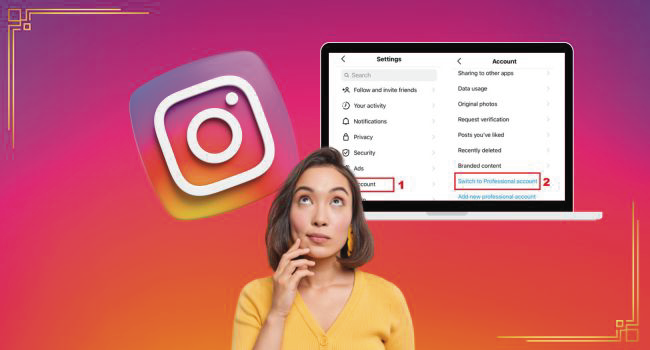
If you want to share data, you must switch to a Business or Creator account. Personal accounts do not have Insights.

To switch:

  • Go to settings.

  • Tap Account.

  • Select Switch to Professional Account.

After that, every post and Reel shows Insights.

Method 1: Check Insights For Share Counts

Open any post. Tap View Insights.

You will see metrics like reach, saves, and shares. The Shares number indicates how many people shared your post with others. It does not show names.

This is the only way to see the total number of shares. It covers both posts and Reels. It works only on professional accounts.

Method 2: Use “View Story Reshares” For Public Stories

Sometimes you can see who reshared your post to their Stories. To check:

  • Open your post.

  • Tap the “⋯” menu.

  • If people reshared it publicly, you will see View Story Reshares.

This view shows active, public Stories that embed your post. The Stories expire after 24 hours, so the list updates or disappears once they end.

If you don’t see the option, it means:

  • No one reshared to Stories.

  • The Stories expired.

  • The reshares came from private accounts.

Guides confirm this method works only for active public reshares.

Method 3: Check Story Mentions

If someone tags your account when resharing, you get a notification. These show up in Stories About You.

This is the most reliable way to see exact names. The tag connects directly to the account.

If they do not tag you, you won’t see them.

What You Cannot See

Instagram protects private actions. These are limits you cannot bypass:

  • DM shares: When people send your post in Direct, you will never see their names.

  • Private account reshares: If a private account posts your content to their Story, you cannot see it.

  • Expired Stories: All Story reshares vanish after 24 hours.

This is by design. Instagram allows only partial visibility for privacy reasons.

2025 Update: The Reposts Feature

Meta rolled out Reposts in August 2025. This lets users repost feed posts and Reels directly. Reposts appear on the follower’s timeline and in the Repost tab of their profile.

For creators, this boosts reach. However, Instagram does not yet give a full list of who has reposted your content. You may see it appear on the reposting user’s profile, but not as a full analytics list.

This feature makes distribution easier while still maintaining privacy integrity.

Troubleshooting: Why You Don’t See Reshares

Sometimes people share your post, but you cannot see it. Here’s why:

  • You are on a personal account → no Insights, so no share data.

  • Reshares expired → “View Story Reshares” only works during the Story’s life.

  • Sharers are private → private Stories never appear to you.

  • Reshares happened in DMs → these never appear in your data.

These are common issues, and none have workarounds.

Grow Your Reach Beyond Shares

Seeing who shares your post gives you useful insight, but real growth depends on how many people actually discover your content. A larger audience means more chances for reshares, mentions, and engagement.

One way creators can boost their visibility is by strategically building their follower base.

If you want to speed this up, Instagram growth services offer flexible follower packages.

It’s a way to give your profile a stronger foundation while you focus on creating content that people want to share.

Pro Tips To Track Shares

  • Ask followers to tag your handle when they reshare. That way, you see every mention.

  • Use captions like “Share this post and tag us” to encourage visibility.

  • For campaigns, track traffic using links or codes to determine when content is shared.

Conclusion

In 2026, Instagram allows you to see counts of shares and sometimes the names of public Story reshares. You also see names when users tag you. Everything else, like DM shares or private Stories, stays hidden.

The new Reposts feature expands reach but does not give detailed analytics. If you want to know who reshared your content, encourage people to tag you. Otherwise, expect to see only counts and partial data.

FAQs | Frequently Asked Questions

Can I see who shared my post in DMs?

No. Instagram does not share that information.

The feature only shows when your post appears in active, public Stories. If no one reshared, if the Story expired, or if the account was private, you won’t see it.

Yes. Only professional accounts show share counts in Insights.

You can see the repost on the user’s profile, but Instagram does not give a full creator-side list.

Neophyta Chatzis Tech Writer

Neo is a content and growth strategist with a sharp eye for trends. She creates forward-thinking content that drives engagement and long-term visibility across social platforms

Top

Your Product was added to your cart successfully!

Continue Shopping Pay Now